
A fence estimate is only useful when the measured quantity, unit price, material, and included work refer to the same project. A wood-material subtotal is not an installed price, and a per-linear-foot installation range is not a detailed bill of materials. The calculators on this page perform those separate multiplications from quantities and rates you supply; they do not provide national or ZIP-code pricing.
Begin with a measured fence plan and established material takeoff. The fence measurement and layout guide explains run and opening dimensions, while the wood fence materials guide covers posts, rails, pickets, and caps. Use those quantities as the basis for a materials budget, then compare installation estimates only after checking that their scopes match.
Measure the project and define scope
Record each fence run, gates, corners, grade changes, and any existing fence to remove. Decide whether a cost figure represents materials purchased for owner installation, labor and materials installed by a service provider, or another clearly defined scope. Note whether posts, concrete, gate hardware, demolition, disposal, delivery, permits, tax, and cleanup are included or priced separately.
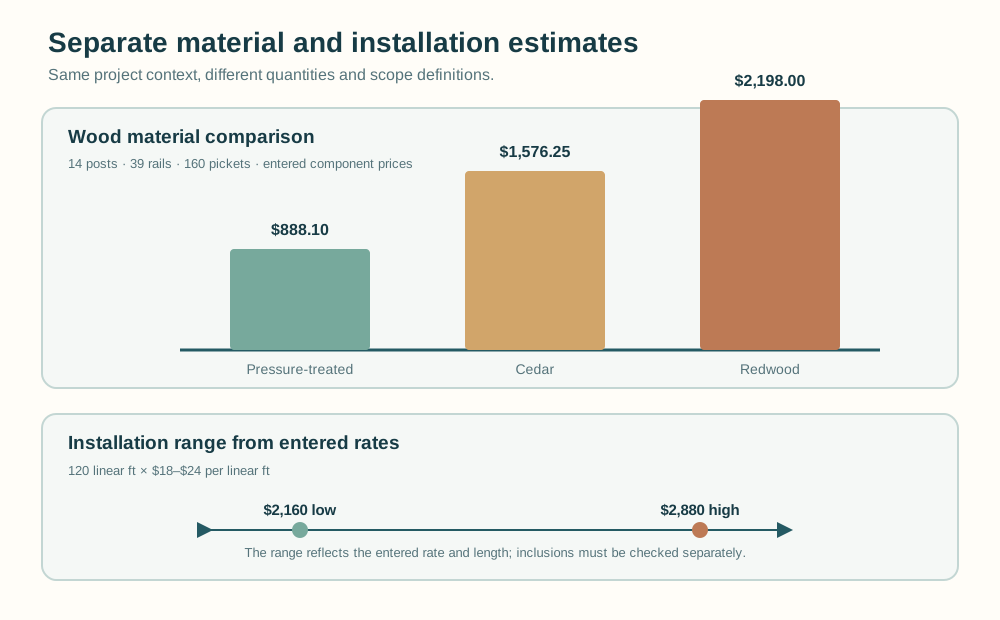
Use one unit convention for the quantity and rate. The basic calculation is quantity × price per matching unit. For a measured 120 linear ft run and an entered $18 per linear ft rate, the arithmetic is 120 ft × $18/ft = $2,160. The units cancel to dollars. That amount means only what the rate is stated to include. If the rate already includes materials or removal, do not add those costs again.
Compare wood material prices
The Wood Fence Material Cost Comparison Calculator compares three entered component prices across pressure-treated wood, cedar, and redwood. It uses the same post, rail, and picket quantities for each material:
material total = posts × post price + rails × rail price + pickets × picket price
For a checkable example, use 14 posts, 39 rails, and 160 pickets. Enter the following illustrative per-piece prices. These amounts are arithmetic examples, not current market quotes.
| Material option | Post calculation | Rail calculation | Picket calculation | Subtotal |
|---|---|---|---|---|
| Pressure-treated | 14 × $18.25 = $255.50 | 39 × $7.40 = $288.60 | 160 × $2.15 = $344.00 | $888.10 |
| Cedar | 14 × $28.50 = $399.00 | 39 × $12.75 = $497.25 | 160 × $4.25 = $680.00 | $1,576.25 |
| Redwood | 14 × $35.75 = $500.50 | 39 × $18.50 = $721.50 | 160 × $6.10 = $976.00 | $2,198.00 |
Each subtotal is independently reproducible. For example, the cedar total is $399.00 + $497.25 + $680.00 = $1,576.25. The comparison does not adjust quantities by species and does not include concrete, hardware, caps, waste, tax, delivery, or labor. If a material choice changes the takeoff, calculate the corresponding quantities separately before comparing a complete materials list.
Build a wood materials budget
The Wood Fence Materials Budget Calculator uses five cost lines: posts, rails, pickets, concrete bags, and hardware purchase units. For each line it multiplies a whole-unit quantity by its matching entered unit price, rounds that line to USD cents, and then adds the rounded subtotals. It does not calculate quantities, choose hardware, or include installation.
Continue the example with 14 posts at $18.25 each, 39 rails at $7.40 each, and 160 pickets at $2.15 each. Add 14 concrete bags at an illustrative $6.85 per bag, plus one aggregate hardware purchase unit priced at $42.35. The five subtotals are $255.50, $288.60, $344.00, $95.90, and $42.35. Their sum is $255.50 + $288.60 + $344.00 + $95.90 + $42.35 = $1,026.35.
The hardware quantity must match the price unit. If the project has multiple hardware products, calculate their quantities and costs from the established hardware schedule, then enter one aggregate purchase unit and its total price or keep that cost outside this calculator. The tool does not infer connectors, fasteners, or a hardware kit from the fence layout. Enter zero to omit a line only when that line is intentionally excluded from the subtotal; zero does not establish that the item is unnecessary.
Estimate installed cost from entered rates
The Fence Cost Calculator returns one amount from measured fence length and an entered price per linear foot. The Fence Installation Cost by Material Calculator and Chain-Link Fence Installation Cost Calculator return low and high amounts from corresponding local rates. The material-specific calculator offers wood, vinyl, and chain-link labels; those labels identify the selected rate category but do not supply a default rate.
For a 120 linear ft run with entered local installation rates of $18–$24 per linear ft, the low result is 120 × $18 = $2,160 and the high result is 120 × $24 = $2,880. The result is a range based only on those rates and the entered length. If gates, removal, disposal, corners, difficult access, or grade changes are not reflected in the rate, include them separately only when they are not already included in the quote.
Do not treat the material comparison or wood-material budget as installation totals. A hired-installation price may combine labor, materials, equipment, removal, and other work. Confirm those components with the estimate provider, and keep the DIY material-only total labeled accordingly.
Compare estimates on matching terms
Put estimates side by side only after aligning the scope. Check that the measured footage, material and fence height, layout, gates, posts, concrete, hardware, old-fence removal, disposal, delivery, taxes, and stated exclusions are comparable. A quote with more included work can be higher without being more expensive for the same scope.
| Check | Record for each estimate | Why it matters |
|---|---|---|
| Quantity basis | Measured linear footage and number of gates | Different quantities cannot be compared as if they described the same project |
| Material and layout | Fence system, height, post and panel layout | Material and geometry affect both takeoff and rate |
| Included work | Materials, labor, posts, concrete, hardware, removal, disposal | Prevents omitted or double-counted line items |
| Other charges | Delivery, tax, permits, cleanup, and stated exclusions | Shows whether the displayed amount is a subtotal or broader project estimate |
| Rate source | Supplier or provider, date, service area, and rate unit | Keeps local inputs tied to the quote and time they came from |
For chain-link work, use the chain-link materials takeoff guide to distinguish the known component schedule from an installation rate. For wood gates, keep the gate assembly and hardware scope visible using the wood gate materials takeoff guide. A component list helps identify what a quote includes; it does not replace the provider’s written scope.
Check boundaries and omissions
Quantities in the species comparison and wood budget must be nonnegative whole units. Unit prices may be zero or decimal amounts but cannot be negative. The installation calculators require a nonnegative quantity and ordered low/high rates; a low rate greater than the high rate is invalid. Currency outputs round to cents. Material lines in the wood budget round separately before their displayed total is summed.
These calculators do not supply market prices, local estimates, taxes, permits, delivery charges, waste allowances, quantities, or a complete project scope. They do not determine fence design, material suitability, installation requirements, or contractor business pricing. Use prices tied to a dated local quote or supplier list, and ask the provider to clarify unclear inclusions before comparing totals.
Use the estimate as a scope check
Use the material comparison for the entered post, rail, and picket quantities; use the wood budget for its five explicit material lines; and use installation calculators only with rates that match the service scope. Keep those results distinct, then reconcile the quantities and inclusions against the project plan and written estimates before deciding which figures are comparable.
Use the calculators
Compare wood fence material costs
Build a wood fence materials budget