
Baluster spacing and railing cost are two separate steps in a railing takeoff. The spacing calculator works on one known rail segment and estimates a baluster count or the clear gap for a count you already know. The material-cost calculator takes known total rail footage, post count, and baluster count, then multiplies each quantity by a matching price you enter. Neither tool determines post locations, designs a guard, selects a product, or supplies market prices.
Lay out balusters on a known rail
Measure the rail segment between the limits where balusters may be placed. Enter the actual baluster width and the maximum clear gap from the selected product or project plan. If the end offsets differ from the default, enter the clear offset at each end. The calculator treats the two end offsets as equal in both modes.
In count mode, the available length is A = rail length − 2 × end offset. The calculator estimates the smallest whole baluster count that keeps the equal clear gaps at or below the entered maximum:
count = ceil((A + maximum gap) ÷ (baluster width + maximum gap))
The resulting equal gap is checked from the remaining length: gap = (A − count × baluster width) ÷ (count − 1) when there is more than one baluster. This gap is a geometric result for the entered dimensions. The maximum gap is a user-supplied constraint, not a rule chosen or validated by the calculator.
Work the count example
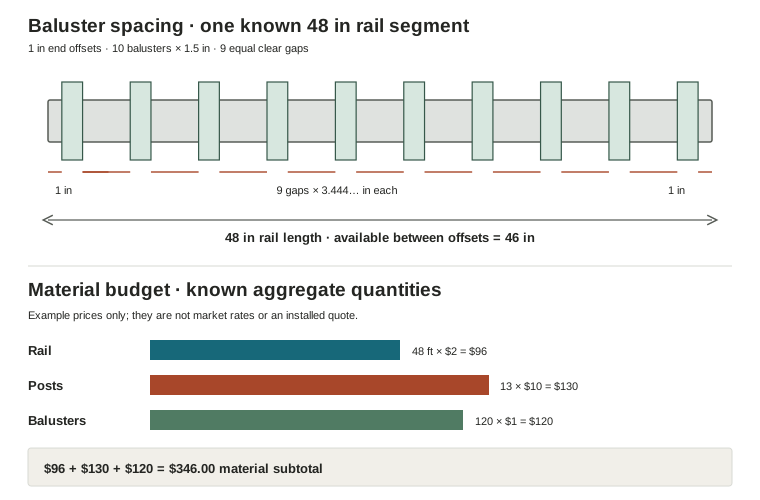
For a 48 in rail, 1.5 in balusters, a 4 in maximum clear gap, and a 1 in clear end offset at both ends, available length is 48 − 2 × 1 = 46 in. The count is ceil((46 + 4) ÷ (1.5 + 4)) = ceil(50 ÷ 5.5) = 10 balusters. Their total width is 10 × 1.5 = 15 in, leaving 46 − 15 = 31 in for 9 equal gaps. Each clear gap is 31 ÷ 9 = 3.444… in, below the entered 4 in maximum. The primary result displays 10 balusters; the supporting value displays the gap rounded to two decimal places, or 3.44 in.
The calculator can also work backward from a known count. With the same 48 in rail, 1 in offsets, 12 known balusters, and 1.5 in width, the clear gap is (48 − 2 × 1 − 12 × 1.5) ÷ (12 − 1) = 28 ÷ 11 = 2.545… in. The tool displays 2.55 in. Known-count mode requires at least two balusters; a negative remaining gap or a count that cannot fit is rejected. In count mode, a 3 in rail with 1.5 in balusters, no end offsets, and a 4 in maximum gap fits exactly two balusters with a 0 in gap.
Calculate spacing from a known count
Use spacing mode when the baluster count has already been established by a plan or product layout. Enter the rail length, equal end offset, baluster width, and a whole-number count of at least two. The calculator subtracts the end offsets and total baluster width, then divides the remainder equally across the spaces between balusters. In this mode, the tool reports the resulting clear gap; it does not check that gap against a code limit.
A result of zero means the entered balusters exactly fill the available length after end offsets. If the count is too large for the available rail length, the input is rejected instead of returning a negative gap. The displayed gap is rounded to two decimals; use the unrounded dimensions in the calculation when comparing close fits.
Budget known material quantities
Use the material-cost calculator only after you have rail footage, post count, and baluster count from the project plan or separate takeoffs. Enter the price in the same purchase unit as its quantity: dollars per linear foot of rail, per post, and per baluster. Do not enter a total installed price as a component unit price.
For an arithmetic example, use 48 linear ft of rail at $2 per foot, 13 posts at $10 each, and 120 balusters at $1 each:
- Rail: 48 × $2 = $96.00
- Posts: 13 × $10 = $130.00
- Balusters: 120 × $1 = $120.00
- Total: $96.00 + $130.00 + $120.00 = $346.00
Each component amount is rounded half-up to cents, and the total adds those rounded subtotals. These example rates are inputs for arithmetic only. The calculator has no price database and does not include labor, connectors, caps, permits, tax, delivery, or other materials unless you account for them separately in your own estimate.
| Tool task | Inputs | Example calculation | Result |
|---|---|---|---|
| Baluster count | 48 in rail; 1 in each end; 1.5 in baluster; 4 in maximum gap | ceil(50 ÷ 5.5) = 10; (46 − 15) ÷ 9 | 10 balusters; 3.44 in displayed clear gap |
| Known-count spacing | 48 in rail; 1 in each end; 12 balusters at 1.5 in | (48 − 2 − 18) ÷ 11 | 2.55 in displayed clear gap |
| Material budget | 48 linear ft at $2; 13 posts at $10; 120 balusters at $1 | $96 + $130 + $120 | $346.00 material subtotal |
Check what the estimates omit
The baluster calculator handles a single straight rail segment with equal end offsets and equal baluster widths. It does not calculate total railing-post count or locations, openings, corners, stairs, transitions, rail joins, or product-specific layouts. The project’s selected product and applicable requirements must establish the allowed gap and installation details. The calculator does not determine code compliance or structural suitability.
The budget tool requires positive rail length and at least one post; baluster quantity may be zero. Prices must be nonnegative finite values and are user-entered. It estimates only the three listed material categories. Its result is not an installed railing quote or complete railing bill of materials. Use post counts already established by a separate plan rather than treating these tools as a post-layout system.
Use quantities within their scope
First confirm the rail segment and the baluster gap constraint from the chosen plan or product, then calculate count or spacing. Carry the resulting count into a separate material budget only when rail footage, posts, and prices all use matching units and scope. Verify all layout and installation requirements independently before purchasing or building.